

QuickBooks Connect is an Intuit’s application that brings thousands of self-employed individuals, business owners, and accounting professionals together so that they share their wisdom and experience. This tool enables you to widen your horizons of knowledge by connecting yourself with the accounting experts. If you are looking for something to grow your business in the terms of finances, QuickBooks Connect is what you need.
From entrepreneurs to business pioneers, everyone can share their stories under one roof. They can share personal thoughts, views, motivation quotes, adversity, and much more.
QuickBooks Connect enables you to access their records on-the-go but in a limited manner.
What Are The Benefits Of Using QuickBooks Connect?
- Connect with a network of thousands of accountants
- Put your hands on the technical advancements
- Enhance your business and finance management skills
- Adopt the high-end technology to support your customers better
- Understand and re-build the HR and employee strategies
- Learn better use of social media for business development
- Get insights into the benefits of value billing
QuickBooks Connect is available for Desktop Plus versions or as an add-on only for the desktop versions. It costs $9.95 per month for every user. It is meant to work with all every latest device such as iPhones, Blackberry, and Android smartphones.
Major Highlights of QuickBooks Connect
- It works perfectly for every web browser that is compatible with Adobe Flash such as Internet Explorer, Mozilla Firefox, Google Chrome, etc.)
- Available for all kinds of PCs, Laptops, and MacsGet as a software application.
- 3. It enables you to access QuickBooks anytime anywhere through the internet
- You can easily get your hands on the important section of QB Desktop software such as Invoices, Customer Info, Receipts, and more.
- You can sync it with QuickBooks Desktop using Intuit Sync Manager to keep your books updated all the time.
- The mobile application can be easily used on all models of iPhone and Android phones.
Why Use QuickBooks Connect?
QuickBooks Connect is popular for its extraordinary features such as the ability to sync with your QuickBooks Desktop, manage your email invoices, access vendors and bills, and make financing solutions available anytime anywhere. The application is highly effective for people who like connecting with others to gain and share knowledge about finance and accounting. Also, it keeps you connected with your clients and records even if you are
traveling, so it is holy-grail for frequent travelers.
How to Register For QuickBooks Connect?
To register for QuickBooks Connect, you need to visit the QuickBooksConnect.com link. The website is frequently updated with new speakers, sessions, and much more.
Ducan, the customer of QuickBooks Connect mentioned:
“All of us have had to learn how to pivot during this time, adapting to new ways of thinking and delivering services to our customers,”
“We’re excited to be bringing a QuickBooks Connect experience that will help us all discover new ways we can go further together.”
What Are the Cons of QuickBooks Connect?
Like any other software, QB Connect has some limitations that can concern some of the users. Let’s see what all limitations it has.
- QuickBooks Connect is not compatible with the QuickBooks’ Mac version.
- Sometimes it fails to sync with the QB desktop. So, there are few issues with the main feature of the application.
Verdict
Adding QuickBooks Connect to your QB Desktop version enables you to connect with the QB customer service team 24X7. Also, if you purchase a Desktop Plus version, you get the Desktop software (Pro or Premier), along with a subscription to the QuickBooks Connect Bundle, therefore you can kill two birds with one stone. This is the best option for those who want to purchase one software that has the functionality of two.
In a nutshell, we can say the features and benefits of QuickBooks Connect are much more prominent than that of its limitations. So, if you want to explore the world of finance, sync your QB desktop with a mobile application, or do not want to pay the upfront fee for a regular QB desktop version and want something extra, QuickBooks Connect is your dream application.
Related Posts
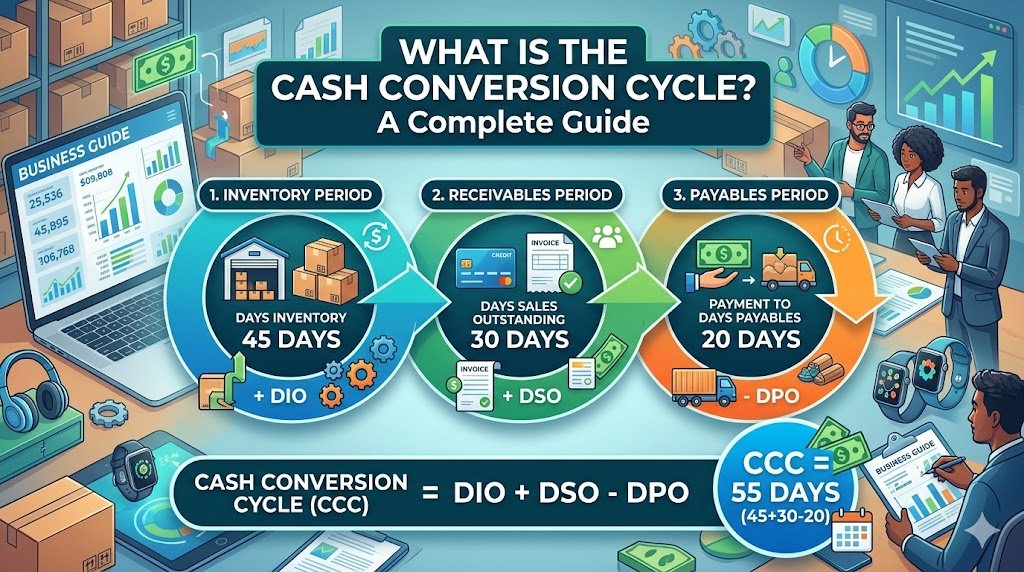
Have you ever wondered why a business that is able to make lots of sales could still run out of cash? The solution can normally be found in the time of their money inflow and outflow. Thousands of products can…
By Khushboo Chhibber

Table of Contents: Introduction Accountancy Update Example: ASC 842 Conclusion Introduction Keeping up to date with accountancy updates is a challenge, but it’s important that you do so. Accountants and business owners need to be aware of changes in the…
By Joseph Williams

For the Certified Management Accountant (CMA) exam, there are some very important points you need to know and consider if you want to excel at this financial management endeavor. This profession requires a lot of dedication and hard work to…
By admin

Outsourced accounting and bookkeeping services have become the ultimate solution for small business firms. It is very important to have a trained team to handle your accounts and books because the right management of finance is the backbone of every…
By admin

QuickBooks Connect is an Intuit’s application that brings thousands of self-employed individuals, business owners, and accounting professionals together so that they share their wisdom and experience. This tool enables you to widen your horizons of knowledge by connecting yourself with…
By Alena Hemsworth

Sage 50 is the most feature-rich accounting software that is being purchased on a large scale. But like any other normal software, it usually comes across errors. One of the most common errors is “Failed to create the license service.…
By admin

Sage 50 accounting software is a modular and integrated software package that comes as an all-in-one helping tool for small and medium-sized businesses that needs accounting modules such as the General ledger, Accounts Payable, Receivable, Payroll, Inventory, Project (Job) Costing,…
By admin

If you’re using one of the most desirable and efficient accounting software that well manages all your business-related tasks i.e. Sage 50 accounting software then, chances are high that you also must be encountering various technical errors from time and…
By admin

Are you facing issues while downloading the Sage 50 account software? This could be due to a number of reasons. The download issues are very common but they can be fixed easily if proper measures are taken, so here we…
By admin