
Sage 50 is the most feature-rich accounting software that is being purchased on a large scale. But like any other normal software, it usually comes across errors. One of the most common errors is “Failed to create the license service. Please try again later”. This mainly occurs when you are trying to open or using the Sage 50 Accounts subscription. But there are ways to fix this error in no amount of time. Here below we are suggesting some of the simplest yet effective ways to resolve this error:
Method 1: Run the Administrator Account in Sage:
For this:
- Open your Sage account, and right-click on Run as Administrator
Now, check if your account is opening and working fine, and there is no error occurring while doing so. After this, you need to keep a shortcut for a “Run as administrator”, then follow the steps given below:
- Now, open the shortcut and then click on the “Properties”
- Open the Compatibility tab
- Then, go to the Privileged level, and click on the option to run this program as admin. Then, click on the “OK” button
- But, if there is an issue while doing so, you can try the next method.
Method 2: Set the Regional Settings To the “United Kingdom”:
- Hold and press Windows+R keys
- Now type ‘intl.cpl’ and then click OK
- Click on Formats and change the regional settings to English (United Kingdom).
- Click OK and open the Location tab
- Set the location to the “United Kingdom” and then click OK
- Restart your device and check if the issue is resolved
Method 3: Reset the License Information:
- Exit Sage 50
- Now rename the folder as “C:\Program Data\Sage\SDK License” instead of “C:\Program Data\Sage\SDK License OLD”
- Then, go to the C:\Program Data\Sage\Accounts and remove or delete the sage.usr file
- Again try to open the Sage account and provide the license information.
This will most probably fix the issue. If not, try the next method.
Method 4: Remove The URL From the Proxy Server:
Removing the below-given URL from the proxy server:
“https://licensing.services.sage.com/lic/services/LicenceService”
Method 5: Remove and Re-install the Sage accounts:
If none of the above methods helps, you can try removing/uninstalling the Sage accounts, removing all the related files and then installing them back.
You need to keep trying until you find the right solution for yourself. But if you keep getting this error, you can try contacting the official Sage support team to get the help.
Recommended:- https://accountiod.com/fix-sage-50-could-not-start-database-engine-error/
Related Posts
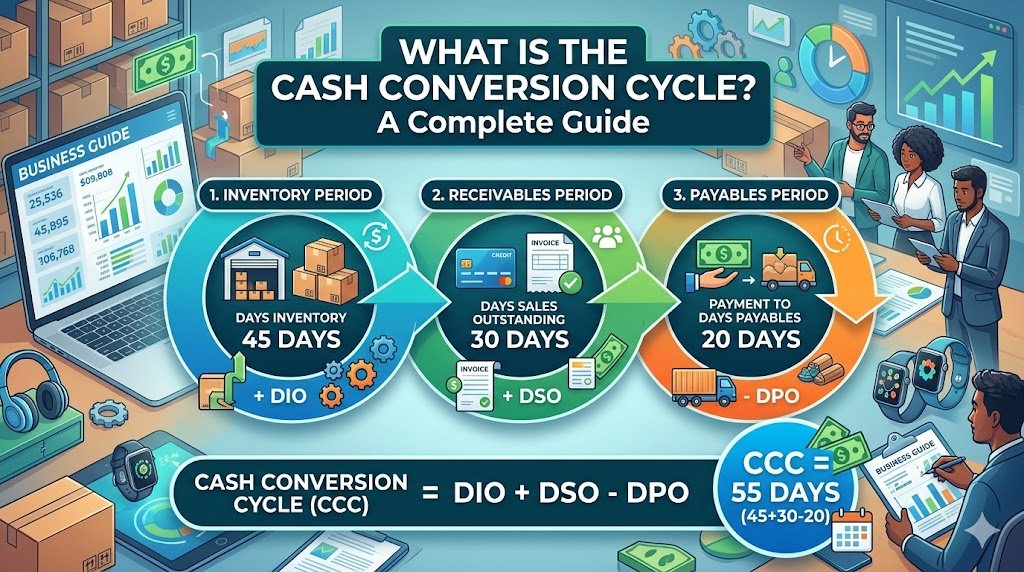
Have you ever wondered why a business that is able to make lots of sales could still run out of cash? The solution can normally be found in the time of their money inflow and outflow. Thousands of products can…
By Khushboo Chhibber

Table of Contents: Introduction Accountancy Update Example: ASC 842 Conclusion Introduction Keeping up to date with accountancy updates is a challenge, but it’s important that you do so. Accountants and business owners need to be aware of changes in the…
By Joseph Williams

For the Certified Management Accountant (CMA) exam, there are some very important points you need to know and consider if you want to excel at this financial management endeavor. This profession requires a lot of dedication and hard work to…
By admin

Outsourced accounting and bookkeeping services have become the ultimate solution for small business firms. It is very important to have a trained team to handle your accounts and books because the right management of finance is the backbone of every…
By admin

QuickBooks Connect is an Intuit’s application that brings thousands of self-employed individuals, business owners, and accounting professionals together so that they share their wisdom and experience. This tool enables you to widen your horizons of knowledge by connecting yourself with…
By Alena Hemsworth

Sage 50 is the most feature-rich accounting software that is being purchased on a large scale. But like any other normal software, it usually comes across errors. One of the most common errors is “Failed to create the license service.…
By admin

Sage 50 accounting software is a modular and integrated software package that comes as an all-in-one helping tool for small and medium-sized businesses that needs accounting modules such as the General ledger, Accounts Payable, Receivable, Payroll, Inventory, Project (Job) Costing,…
By admin

If you’re using one of the most desirable and efficient accounting software that well manages all your business-related tasks i.e. Sage 50 accounting software then, chances are high that you also must be encountering various technical errors from time and…
By admin

Are you facing issues while downloading the Sage 50 account software? This could be due to a number of reasons. The download issues are very common but they can be fixed easily if proper measures are taken, so here we…
By admin