
Are you facing issues while downloading the Sage 50 account software? This could be due to a number of reasons. The download issues are very common but they can be fixed easily if proper measures are taken, so here we have compiled a list of all recovery methods and preparation tips that will help you combat the sage 50 download issues.t
Before beginning with the guide given by us, make sure you are logged in as an Administrator on your computer. After that follow our guide and you can easily get rid of the “Sage 50 is not downloading” error.
Important Measures to Take Before Starting Sage Download:
Make sure you prepare your device before you begin. For this, follow the guide given below:
- Check The System Requirements:
- Processor operating frequency:
- Pro and Premium Edition: 1.0 GHz or higher (2.0 GHz recommended)
- Quantum and Accountant Edition: 2.0 GHz or higher (multiple-core processor operating at 2.33 GHz recommended)
- RAM: 4 GB to 6
- hard disk space: 4 GB ( extra 1 GB needed for installation)
- An updated version of Internet Explorer is required
- Microsoft supported version of Windows 8.1 or Windows 10 (latest updates from Microsoft)
- SVGA monitor of 256-colour or higher with a minimum resolution of 1024 x 768.
- Check Network Installation:
- Follow the Correct Way to Download the Sage Software
- Type your Email address and Password
- If you are linked with multiple accounts, click on “Select” to the one you want to use
- Now, go to the “Find Download” option and choose one from the list:
- Your product serial number – type your serial number
- One of your products – choose your relevant product from the
- Product listOne of your registrations – Pick the relevant registration from your list of all registered software
- Then click on the search icon
- Search the required download and click on Download.
Before installing the Sage 500 software on your device, make sure your device meets the minimum system requirements which are given here below:
Copied from https://www.sage.com/en-ca/products/sage-50cloud/sysreqs/
System Requirements for Sage 50 download:
The Sage download can only proceed with a strong network connection. If you are planning to save data on a server, you must be able to access the server before you begin the download or installation. If required contact your ISP to make the necessary arrangements
In order to download the Sage software, you must have the Sage account to log in. If you don’t have an account you can create one from Sage login. Once you are done creating the account, go to the same Sage login page and:
Now as per your Web-browser, you will be asked to pick a location to save your download or it may go to the “Download” folder by default. But you need to remember the exact location.
After the download is complete, you need to move toward the installation. In order to install the Sage software or a Sage update, double-click on the download set up file and then run it. Make sure no other instance of Sage software is running on your device while the installation takes place.
Keep the activation key and serial number ready with you to complete the installation and setup.
Troubleshooting of “Sage 50 Accounts Not Downloading” issue:
These were the essential ways that you need to consider before starting the download process. But if you are not able to download the Sage 50 software on your device, you need to follow some important corrective measures. Here we have listed some of the effective recovery ways to fix the download issues with Sage 50.
Method 1: Run an Antivirus Scan and Then Turn Off Antivirus Software
An antivirus scan will remove all the malware, virus and other security threats from your device as these can interrupt in the download and installation. Hence you must:
- First, scan your system with your antivirus program and remove all the vulnerabilities
- Then, turn off and disable the antivirus for a while and begin the download.
Method 2: Install the Windows Update
For downloading the Sage 50 software, your Windows operating system must be up to date. For this, you can check the Windows update and install them. Want to know how? Check the steps given below:
- Go to Start >> All Programs >> Windows Update.
- From the Windows Update window, go to Check for Updates.
- On the next screen, you will be informed about all the necessary or optional updates available for your OS.
- Choose the updates you want to install for your WIndows
- Click on Install updates
- After installation, restart your computer.
After updating the version of your Windows or installing the available updates, try to download the Sage 50 accounts and check if the download can be completed without any hassle. But if the issue still persists, try the next method.
Method 3: Launch the Installation Directly From Install Folder
- Press the WIndows+R keys
- Now in the prompted box, enter %temp% and then click OK.
- Search and open the Sage accounts
- Then, right-click on InstallV.exe and then choose Run as administrator
To get more information about Sage 50 download and installation, go to the Sage help center and contact the support team for guidance
Recommended: https://accountiod.com/fix-connection-manager-not-responding-issue-sage-50/
Related Posts
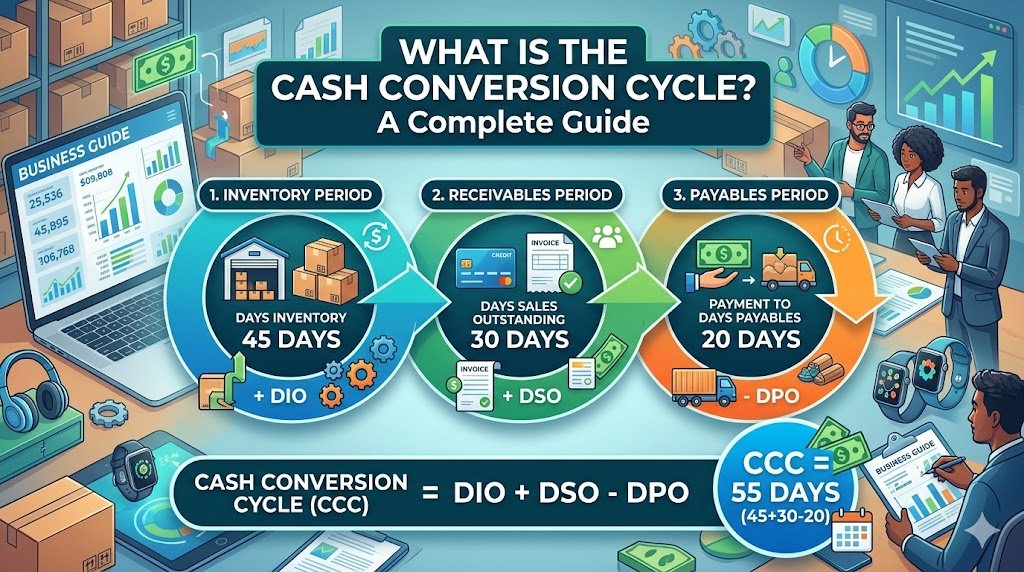
Have you ever wondered why a business that is able to make lots of sales could still run out of cash? The solution can normally be found in the time of their money inflow and outflow. Thousands of products can…
By Khushboo Chhibber

Table of Contents: Introduction Accountancy Update Example: ASC 842 Conclusion Introduction Keeping up to date with accountancy updates is a challenge, but it’s important that you do so. Accountants and business owners need to be aware of changes in the…
By Joseph Williams

For the Certified Management Accountant (CMA) exam, there are some very important points you need to know and consider if you want to excel at this financial management endeavor. This profession requires a lot of dedication and hard work to…
By admin

Outsourced accounting and bookkeeping services have become the ultimate solution for small business firms. It is very important to have a trained team to handle your accounts and books because the right management of finance is the backbone of every…
By admin

QuickBooks Connect is an Intuit’s application that brings thousands of self-employed individuals, business owners, and accounting professionals together so that they share their wisdom and experience. This tool enables you to widen your horizons of knowledge by connecting yourself with…
By Alena Hemsworth

Sage 50 is the most feature-rich accounting software that is being purchased on a large scale. But like any other normal software, it usually comes across errors. One of the most common errors is “Failed to create the license service.…
By admin

Sage 50 accounting software is a modular and integrated software package that comes as an all-in-one helping tool for small and medium-sized businesses that needs accounting modules such as the General ledger, Accounts Payable, Receivable, Payroll, Inventory, Project (Job) Costing,…
By admin

If you’re using one of the most desirable and efficient accounting software that well manages all your business-related tasks i.e. Sage 50 accounting software then, chances are high that you also must be encountering various technical errors from time and…
By admin

Are you facing issues while downloading the Sage 50 account software? This could be due to a number of reasons. The download issues are very common but they can be fixed easily if proper measures are taken, so here we…
By admin