

Unquestionably, PayPal has come out as a savior for all of you who are supposed to deal with international online monetary transactions frequently. There’s nothing that the platform can’t do; you can transfer money from your Visa gift card through it, buy Bitcoin from PayPal, and whatnot.
Apart from its innumerable services, there might also be an error that the users might face at times; PayPal 403 forbidden error. Herein, you will get to know what it means, its causes, and the 6 best solutions to overcome it.
What Does PayPal 403 Forbidden Error Mean?

Whenever you see a PayPal 403 forbidden varnish cache server while sending or receiving money on PayPal, understand that you can’t access the page you are trying to access because you have been blocked by your web server. You will get any of the following prompts when a 403 PayPal error occurs-
~This 403-forbidden PayPal error acts as a roadblock, preventing you from accessing your balance and monetary transactions, due to which you feel hopeless amidst such a horrible technical glitch.
If you are thinking about “Why is my PayPal saying 403 is forbidden?”, then the following explanations will clear your doubts regarding it:
- Your IP has blocked your PayPal: Because of your web server specs, you may have been blacklisted from accessing PayPal. Your IP address plays a prominent role here, as it’s very likely that it has blocked PayPal within its list.
- You are disallowed to access PayPal: Since PayPal has undergone several changes in its server configuration, you can discover that you will have to take specific permission from their system that’s not granted to you.
- Problems with your IP: There are chances that it’s your IP address that is not responding properly; in this case, all you need is to contact your ISP and get it amended as soon as possible.
Also Read: How to Cancel PayPal Payment?
How to Fix the PayPal 403 Forbidden Error?
From above, you have understood the meaning and the causes of the varnish cache server PayPal error; now it’s time to explore the solutions which will help you troubleshoot the PayPal 403 forbidden guru meditation error.
The topmost 6 solutions are explained below in detail; simply read them thoroughly.
1. Make Sure You Enter the Correct URL

It’s excessively common for most of you to enter an incorrect URL which results in PayPal error 403 forbidden. Be cautious of the link you are providing in the address bar because if it goes out wrong, you will surely face the 403 error.
To see a specific web page or file, type the URL accordingly. Always remember to not end your PayPal URL with a slash (/). Although, if any directory URL ends with it, most of the servers tend to block those directory URLs for security purposes. Here’s how to verify the same:
- Go to the browser using any compatible device connected to the Internet.
- Launch the PayPal website.
- Verify the URL and make sure that the end part of the URL doesn’t have any special characters.
2. Remove Cookies and Caches
It’s highly probable that the reason you are facing the issue is hidden in your browser only. You can get out of this error by deleting all of your browser cache and cookies, and you will have the problem solved. However, you have to sign in again to all of your previous websites once you clear the cache.
Let’s see how you can remove cookies and caches:
- Visit your browser and open “Settings”.

- Choose the “Privacy and Security” option.

- Select the option that says, “Clear browsing data” and check the boxes next to the following options:
- Cookies and other site data
- Cached images and files
- Click on “Clear data” to term the end of the process.

3. Disable Your VPN
You may not be aware of the fact that PayPal often blocks those users who try to sign in using virtual private networks (VPNs). If you try to log in to your PayPal continuously, you may confront a 403 forbidden error. I will advise you to examine if this happens to you too frequently.
If such is the case happening to you frequently, simply disable your VPN and then try accessing PayPal. It’s likely that you will be able to reach out to PayPal this time without any problem.
However, it’s also true that most of the websites don’t disallow every VPN to access the board as they restrict a few only. If your regular work requires you to use VPN, you can switch to a different service that has not been banned from accessing the board.
Let’s understand how you can disable VPN through the following illustrated steps:
- Press the command “Windows + I” to open the “Settings” app.
- Move towards the right lane and select the “Network and Internet” option.

- In the next step, choose “VPN”.

- A list will appear out of which click on the “VPN service” that is to be disabled.
- To save your changes, click on “Delete.” Doing this will mark the successful end of the process.
4. Contact Your ISP Service Provider
One of the prime causes of your PayPal error 403 forbidden issues could be your ISP. Undoubtedly, you can blame your ISP surely if you discover that the webpage works for others but not for you. It is highly possible that PayPal has blocked your public ID, which is assigned to you by your ISP.
What you can do at this point is try accessing your PayPal account and connecting to another router. However, it’s better to contact your ISP when you can’t get rid of the PayPal 403 forbidden error, and fortunately, if nothing seems too serious, they can help you in such a situation.
5. Contact PayPal Support Team
If nothing seems to work in your favor, it may be possible that your PayPal account has been temporarily blocked. With this possibility, you should contact the PayPal support team to overcome PayPal error 403 forbidden. Either reach out to them through forums or directly call its customer care executives. Alternatively, contacting PayPal over its social media is also another great option.
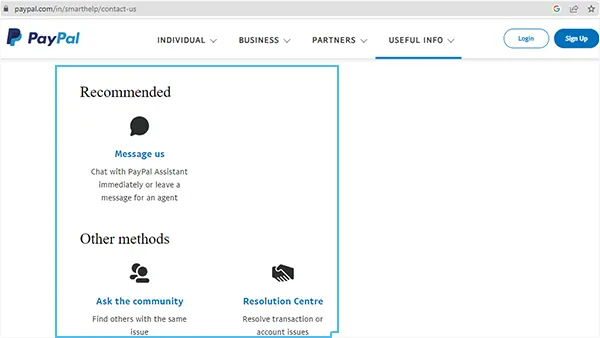
Let me now show you a general way using which you can contact PayPal’s customer care representatives to get rid of the 403 error:
- Go to your browser and open up the PayPal Customer Support page.
- You can use any of the options given here to raise your concern, and the team will provide you with the solution accordingly.
- According to the specimen displayed below, you will get to know that you can:
- Message them.
- Ask your queries and doubts in the online community.
6. Try Accessing PayPal After Sometime
In spite of implementing all the actions, You may also find out that the PayPal forbidden 403 error still persists. Don’t lose out your confidence here as there remains another little choice for you, which is nothing but to try accessing your PayPal account again after some time.
In many instances, this trick works out and hence is found to be extremely useful when trying to fix the PayPal 403 forbidden error since the error is the result of two prominent reasons, i.e., either a glitch on the part of PayPal’s website or that of your ISP.
Besides, it’s highly probable that IT professionals from their team may be working on the problem at the back end to solve it. Therefore, give it some time and revisit the website again, try accessing your account, and you will be amazed to see the miraculous result, and you will know what it is all about.
Conclusion
It can be easily inferred that the 403 forbidden PayPal refund error is nothing but an HTTP status code; thereby, you are displayed a forbidden error. Furthermore, you can also see this error on your screen when you are forbidden to access it.
From above, you saw several solutions that help solve the PayPal forbidden 403 error; however, if none of the above proved of any aid to you, connect with PayPal support as it is the last resort, and they will surely provide the further assistance you need.
I am pretty sure that you are no more furious or enraged for not being able to track the meaning, cause, and solutions to handle the PayPal 403 forbidden guru meditation error as you know it in depth as of now.
Related Articles:
- What is My PayPal Username?
- How Old Do You Have to be to Use PayPal?
- How Long Does PayPal Refund Take?
FAQs
Ans: The proximate cause is that the page you want to access is cached. However, its link is swapped in a code. To solve this issue, you should delete your browser’s cookies and cache.
Ans: 403 error usually occurs when the web server displays an HTTP status code. Most of the time, the 403 error gets fixed through a simple refresh trick.
Ans: Since Elon Musk owned X.com, which later merged with Confiity, to create PayPal, he is known as a cofounder of PayPal.
Sources:
Related Posts

A web3 wallet is essentially your tool for interacting with the decentralized web, or web3. Think of it like your digital wallet that not only holds your cryptocurrencies but also lets you manage various digital assets, like NFTs. More than…
By Joyce Pierce

Digital wallets make it easier for consumers to pay without having to use physical cash. This makes transactions quicker and safer. Even in remote areas with no banks, e-wallets allow people to join the digital economy by using their phones. When more…
By Joyce Pierce

Have you sent a payment to the wrong person through PayPal? Do you want to reverse a payment? Don’t worry; you can cancel a payment and even get your money back through a PayPal refund. Go through this blog to…
By Team Accountiod

Do you also find cash payments burdensome? Or love to make cashless payments through the new Cash App? If yes, make sure to activate your Cash App Card properly. Once it is active, you may also have to load it…
By Richa Taneja

There’s a common problem faced by most millennials these days; it’s the bills and their online subscription. Most of us don’t even realize that we are paying for so many unnecessary online subscriptions, magazines, and streaming services (Ex= Amazon Digital…
By Team Accountiod

Key Points Cash App is the biggest peer-to-peer transfer application with more than 50 million monthly active users.You can send and receive money even without card to anyone in the US with online transfer.The online banking application offers a reloadable Cash…
By Team Accountiod

Wondering what to do with a gift card someone has given you? Why not add the Visa gift card on Amazon and make the right use of it? Yes, that’s right, you can use any gift card as a payment…
By Team Accountiod

Unquestionably, PayPal has come out as a savior for all of you who are supposed to deal with international online monetary transactions frequently. There’s nothing that the platform can’t do; you can transfer money from your Visa gift card through…
By Team Accountiod

Who doesn’t love gift cards? We think it is the most thoughtful gift to give to anyone as the money can be transferred easily to the bank account through PayPal. If you have a gift card that you wish to…
By Team Accountiod