
Since its inception in 1998, PayPal has made it simple to send and receive money to anyone anywhere in the world for a nominal cost or for free if the transaction is made within the US.
Not only that, it can be integrated into websites and third-party applications like PayPal on Amazon, eBay and other e-commerce enterprises as a payment gateway and has made it simple to buy and sell goods online.
Creating a PayPal account to receive payment on PayPal is free and should only take a few minutes if you don’t already have one. Once everything is set up, you must enter your banking information to send and receive money more conveniently.
In this blog, we will explain how to receive money on PayPal and all the methods involved with receiving payments on PayPal. But first, let’s learn how to set up a PayPal account in the next section.
- How to Set Up A PayPal Account?
- How Do You Receive Money with PayPal?
- How Do You Receive Money on PayPal Without A Bank Account?
- How to Use PayPal to Receive Money Without SSN?
- How Do I Accept Money on PayPal Without Fees?
- How To Receive Money On PayPal From a Friend?
- How Do You Receive Money With PayPal Business Account?
- How Do You Receive Money on PayPal from eBay?
- How to Use PayPal to Receive Money from Facebook?
- How to Create an Invoice to Receive Money with PayPal?
- Frequently Asked Questions
How to Set Up a PayPal Account?
As you know that PayPal is the easiest and the most convenient means to receive payments, and before learning how to accept money on PayPal, it is mandatory to have a PayPal Account.
Follow the steps given below to create a new PayPal account:
- Launch the internet browser on your computer and go to https://www.paypal.com.

- Next, Click on the Signup button in the top right corner of the screen.

- On the next screen, select whether you’re creating a personal or business account. Choose your account type and press Next.
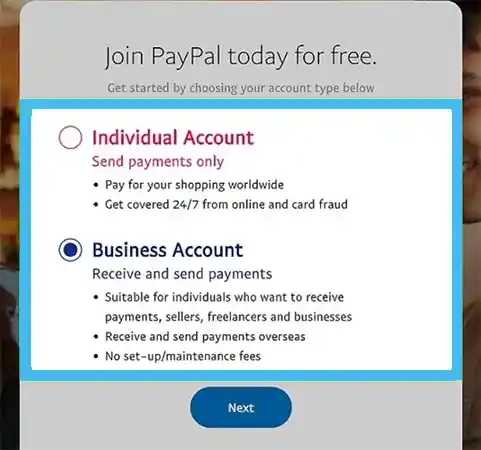
- You must provide your email address, then create and confirm a password on the following page. Click Next once you’re done.

- Again, Click Next after providing the details for your new account.
- You must then enter both your phone number and email address. Click Agree and create account after filling out the necessary information, and your PayPal account will be created.
Now that your PayPal account is all ready to use, let’s learn how do you receive money on PayPal in different ways in the coming section.
How Do You Receive Money with PayPal?
PayPal offers three methods for receiving payments: invoices, PayPal.me links, and email addresses. After receiving the notification, the sender can start the payment to your account. After the funds have arrived in your account, you will be notified by email.
1. Email
You can receive money to your PayPal account from anyone who has an email address. Just log in to your account, enter the sender’s email address, and the amount to be received, and then click on Request Payment.
PayPal will send your payment link where the payment can be made once you’ve entered your email address, the requested amount, and a note for the payment request. The sender does not always need to have a PayPal account to submit the money. A credit/debit card or a PayPal account can be used to pay through the link. PayPal will send a notification to your account once the transaction is complete.
2. Invoices
You can produce invoices and send payment requests to your clients using your PayPal business account. The best part about a PayPal business account is that it lets you add your company’s logo, an invoice number, schedule payment dates, and frequencies, and choose the currency for the payment.
You can update your company invoices anytime you want and then email them to your client to receive the payment to your PayPal account directly. Your client can use a debit card, credit card, or PayPal account to make the transaction by clicking the payment link in the email.
Also Read: Zintego.com
3. Paypal.Me link
PayPal.me link is an excellent way to receive money for freelancers, service providers without websites, or even for a college student looking to raise money for a charitable event. PayPal.me is a custom payment link that you can share via SMS, WhatsApp, and any other social apps so that your clients may pay you by just clicking on the link.
You can go to www.paypal.me and select your unique link to establish a Paypal. me link. You can share your PayPal.me link with others when it has been verified so they can make payments directly to your PayPal account.
Set Up PayPal.me Link
Here are the steps to set up your PayPal.me link in your PayPal account:
- First, open PayPal.me on your device.
- Login to your company’s account or private account.

- Next, click on get started.
- Here you need to enter the name of your PayPal link. Make sure the name is unique, as it will be set up as a URL. Tap Get PayPal. Me to proceed.

- Tick the terms and conditions boxes to agree to the terms and conditions and proceed.
- You now have a quick URL that you can share with customers whenever you want to receive payment directly into your PayPal account.
Now, let’s look at various methods of receiving payments on PayPal in the coming sections.
How Do You Receive Money on PayPal Without A Bank Account?
Users ask, “how do I get money on PayPal without a bank account?”. Well, this is the best part about PayPal, you can receive money in your PayPal account linking to your bank account. But keep in mind that you’ll need a bank account to be able to withdraw the money.
In other words, PayPal acts as a wallet that you may use to send and receive payments and purchases online, quite like the Walmart Money Card and BNB on TrustWallet.
To receive money into your PayPal account without a bank account, you just need to sign up to PayPal with an email address and set up your account. Then you can send a PayPal Payment link that is associated with your email address to the payee to receive the payments into your PayPal wallet.
How to Use PayPal to Receive Money Without SSN?
PayPal’s users ask how to use PayPal to receive money without SSN, but the answer is that it is not possible to receive money on PayPal without SSN.
PayPal changed its policies in March 2019 stating that all the accounts receiving the payments must have provided a Social security number.
However, the SSN is required by PayPal and any other financial body to comply with government rules and regulations, and verify each account to maintain a safe banking community.
How Do I Accept Money on PayPal Without Fees?
People frequently ask, “how to receive payment through PayPal without any fees?” Well, PayPal does not charge any fees if you want to receive money from your friends or someone with a personal account type.
PayPal charges fees in two cases, first, in the case of a business account for sending invoices, and second transactions made outside the US.
How To Receive Money On PayPal From a Friend?
The method for receiving money on PayPal from a friend is different from the other methods. The process will differ based on if your friend is a PayPal user or not.
If the person is a registered PayPal user, follow the steps below:
- Open your PayPal account.

- Now, Click on the Request button at the top of the page.

- Here, enter your friend’s email address in the given field and click on Next.

- Type in the amount you want to receive in the given field.

- You can add more people to this request and add a note. (Optional)
- Lastly, tap Request a Payment.

- And that’s it, your friend can pay you directly through the payment link sent to their email.
How Do You Receive Money With Paypal Business Account?
PayPal’s users often ask, “how do I receive money from PayPal business account?”
You can link your PayPal business account with your website or online store by adding HTML codes to your website.
PayPal has a tutorial for the same, you can refer to it for adding the PayPal business account to your business website and start receiving money into your account.
You know that a PayPal account can be linked with Third-party websites, let’s learn how to do this in the next section. Besides receiving, you can also send money on Apple Pay through PayPal for business transactions.
How Do You Receive Money on PayPal from eBay?
You can receive money on PayPal from eBay by linking it to your eBay account. But first, make sure your eBay account and PayPal bank account are set up correctly.
To link your bank account to eBay, follow the steps we have listed below:
- Open eBay’s official website in your browser.

- Tap on your account name in the upper left section.

- Click on Account Settings.

- Now go to the Account section on the My eBay page.

- Select PayPal account in the Payment section.

- Now, follow the on-screen prompts carefully and that’s it.
You will receive a confirmation mail from both portals and your PayPal account will be linked to eBay.
How to Use PayPal to Receive Money from Facebook?
Facebook business owners can easily link their PayPal accounts to receive money from Facebook.
Follow the steps we have jotted down to do the same:
- First, Go to Facebook and log in to your account.

- Tap the account icon in the upper-right corner of the page.

- Click on the Settings and Privacy tab.

- From the given options, choose Settings.

- Now, select Facebook pay.

- Click on Add a Payment method to link your PayPal account.

- Select PayPal from the pop-up window.

- On this page, you can enter your PayPal login info and save the changes.

- Your PayPal account is now linked with Facebook.
How to Create an Invoice to Receive Money with PayPal?
PayPal’s users can create invoices to send to their clients for receiving payment. These invoices can be customized according to the payment, and frequency, and can be scheduled easily.
Here is the process you must follow to create your PayPal invoices:
- First, log in to your PayPal account.
- Click on Create invoices button from the right side of the page.

- Enter the email address of your client in the given field.

- On this page, fill out all the details required by PayPal to generate an invoice for you.

- And that’s it. Click on the Send button and PayPal will automatically send the invoice to your client.

Also, checkout our detailed guide on avoiding Bank of America overdraft fee when you make excessive payment then current balance.
Frequently Asked Questions
Ans: You can receive money in your PayPal account through email or phone number registered with your account. Once the payment is made, PayPal will send a message notifying you about the payment credit.
Ans: To accept money on PayPal, you need to confirm and verify your email address and phone number. After the authentication is complete, you can start receiving payments on PayPal.
Ans:To claim a PayPal payment:
- Log in to your PayPal account.
- Go to the Dispute section and select the date of the transaction.
- Tap on Report a Problem, then click on Dispute Transaction.
Related Posts
The financial services industry built its products for a specific person: someone in their late fifties, with a lifetime’s savings to preserve before retirement. That character was real. For a long time, it was most of the market. What the…
By Khushboo Chhibber

No-fluff, practical advice to grow your $10K – whether investing your first money or lump sum. This guide is perfect if you’re searching for how to invest 10k or looking for the best way to invest 10k in 2026. Quick…
By Khushboo Chhibber
As the payments industry evolves with newer, faster payment methods—and as emerging economies increasingly adopt mainstream options such as cards, wire transfers, ACH, and cross-border, multi-currency remittances—transaction volumes continue to rise, and payment corridors are becoming more intricate. This growing…
By Team Accountiod

Do you know that the forex trading market is the biggest financial market in the world? (DailyForex: Forex Industry Statistics) If you are also a part of it and often have to deal with global finance and forex, then understanding…
By Team Accountiod
When you think of investing in an initial public offering (ipo), it might seem like a daunting process at first. The unfamiliarity of procedures, combined with the traditional reliance on brokers and paperwork, often discourages potential investors. However, with the…
By Joyce Pierce

Key PointsStrategic financial management is a method of using resources intentionally to achieve financial freedom and generate profits. Best strategies to streamline finances: Use money as a tool. Invest consistently. Keep track of your CIBIL score. Take responsibility for your…
By Joyce Pierce

If you have a checking or savings account with Citibank but are unsure about how to send or receive money from friends, family, or companies, we can help! The only important thing you need is a Citibank routing number for…
By Team Accountiod

There’s something similar between Elon Musk’s self-driving car Tesla and today’s digital banking trends. Everything is automated and we are simply sitting in the driver’s seat, directing and monitoring the systems towards our goals. Likewise, digitization has transformed the financial…
By Joyce Pierce

Ally Bank has cemented its place among the top online banks in US markets and Ally Bank reviews are also quite positive. Its competitive interest rates and high yields, with no minimum balance required to maintain, have made it a…
By Team Accountiod