
Sage 50 accounting software is a modular and integrated software package that comes as an all-in-one helping tool for small and medium-sized businesses that needs accounting modules such as the General ledger, Accounts Payable, Receivable, Payroll, Inventory, Project (Job) Costing, Time and Billing, etc.
Having such ‘user-friendly’ features that are without any doubt is suitable for all businesses across the globe; Sage 50 Accounting software is considered the most popular accounting program that well-manages all business-related tasks.
However, not only these features Sage 50 accounting software also have another great feature called the “Lock Date Feature.” With this feature, Sage aimed to provide proficient accounting management to its 6 million users.
| Table of Content |
| What is Lock Date Feature in Sage 50 Accounting Software? |
| How Lock Date Feature in Sage 50 Accounting Software Works? |
| How to Activate/Set Lock Date Feature for Sage 50 Accounting Software? |
| How To Fix “Do Not Allow Transactions Dated Before” Tab Grayed Out Issue in Sage 50? |
What is Lock Date Feature in Sage 50 Accounting Software?
The Lock Date Feature in Sage 50 Accounting Software completely locks down a particular accounting period by restricting the specified user from making transactions into that period.
Basically, this feature is considered ideal because it helps to avoid adding transactions mistakenly to those accounting periods that are ‘confidential’ for users. Not only that but, it also helps you in situations when you want to close down a previous month/year of which you have finished the accounts as well as has also produced the financial report to examine the financial status of your business and, further, don’t want to make any changes to it.
Also Read:- 6 Best Budget-Friendly Accounts Receivable Software
How Lock Date Feature in Sage 50 Accounting Software Works?
Once you activate this ‘Lock Date’ feature in your Sage account, it will automatically take charges for maintaining your transactions secure and if by chance any user attempts to enter transactions before the lock date period, he/she won’t be able to do so as Lock Date feature will show an error or a warning message that reads— “Users who have no lock date access, they can’t post to the locked period.”
Now, as enough has been discussed related to the ‘Sage 50 Lock-Date’ feature, its importance, and how it works; let’s move on to follow the below-given steps/instructions to activate this feature in order to lock transactions dated before a certain date.
How to Activate/Set Lock Date Feature for Sage 50 Accounting Software:
- To do so, you need to click on the ‘Settings’ from the menu bar.
- From the ‘Settings’ simply select the ‘Lock Date’ option.
- Then, select the ‘Lock posting before’ checkbox, and in that you have to enter the required date to finally set the lock date period.
- That’s it! In the end, press the ‘OK’ button to apply the changes you have made.
- Now, in order to set user’s access to lock date, what you have to do is, go to your Sage 50 accounting software icon and click on it in order to open your Sage accounts.
- Then, log in to your Sage account as Manager.
- After that, open your Sage’s menu bar, and from there, click on the ‘Settings.’
- Further, from ‘Settings’ you have to click on the ‘Access Rights.’
- Now, from the available list (that is in front of you) select the user in order to permit him access to ‘Lock Date’ and then click on ‘Edit.’
- After doing so, expand your ‘Settings’ menu and select the checkbox of “Lock Date Settings” to grant access to the required user to override the lock date.
- That’s it! Now, click on the ‘OK’ button to apply changes and then click on the ‘Close’ option to end the process.
And, alternatively, if you want to remove/deny access to override the lock date, what you can do is, simply uncheck the checkbox of “Lock Date Settings.” This way, Sage 50 Accounting blocks access and restricts the user from adding transactions dated before the start date of the prior fiscal year with the help of the ‘Lock date’ feature.
However, if you wish to change this and want to grant access to the required user to override the lock date, but unfortunately, if you are unable to do so as the option to grant or remove access is grayed out; then, in that case, do not panic as you can solve this issue manually if you correctly follow the below-mentioned steps:
How To Fix “Do Not Allow Transactions Dated Before” Tab Grayed Out Issue in Sage 50
- To fix this issue, first and foremost you have to log in to your Windows operating system as an ‘Administrator.’
- Then, make sure that all your other screens and Sage 50 windows are closed and you’re in single-user mode.
- After that, from your ‘Home Window,’ simply go to the ‘Setup’ option in order to select the ‘Settings.’
- From the ‘Settings’ click on the ‘Company’ option and then on the ‘System’ option.
- Afterward, select the “Do not allow transactions dated before” option.
- Along with that, click on the ‘Date’ tab as well in order to select a requisite date.
- Now, enter the selected date and click on the ‘OK’ button to apply changes you’ve recently made.
- That’s it! This how you can manually fix “Do not allow transactions dated before” tab grayed out an issue related to your Sage 50 lock Date feature.
Recommended: https://accountiod.com/resolve-sage-50-accounting-cannot-be-started-error/
Related Posts
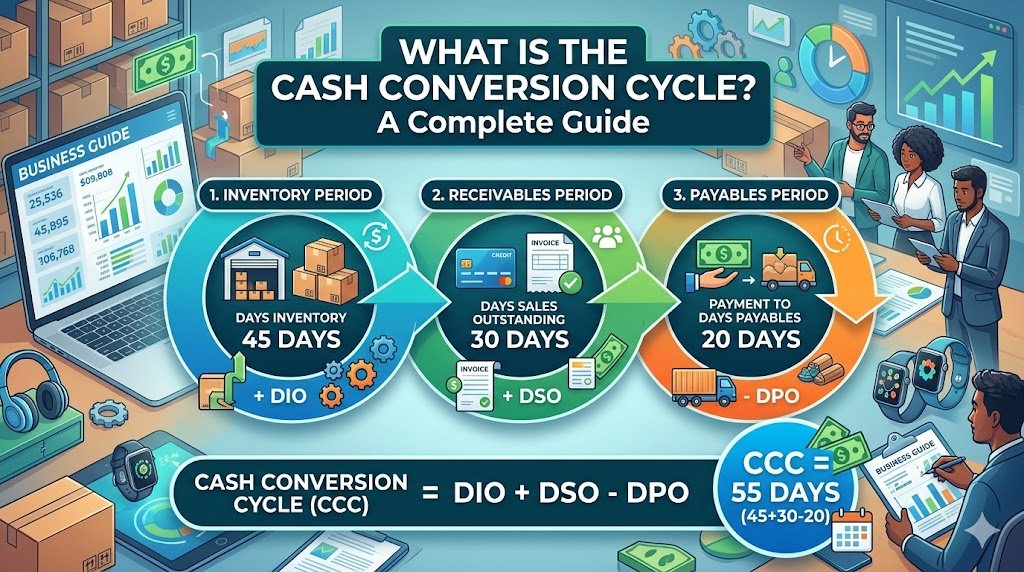
Have you ever wondered why a business that is able to make lots of sales could still run out of cash? The solution can normally be found in the time of their money inflow and outflow. Thousands of products can…
By Khushboo Chhibber

Introduction Keeping up to date with accountancy updates is a challenge, but it’s important that you do so. Accountants and business owners need to be aware of changes in the law and regulations because these can impact how the business…
By Joseph Williams

For the Certified Management Accountant (CMA) exam, there are some very important points you need to know and consider if you want to excel at this financial management endeavor. This profession requires a lot of dedication and hard work to…
By admin

Outsourced accounting and bookkeeping services have become the ultimate solution for small business firms. It is very important to have a trained team to handle your accounts and books because the right management of finance is the backbone of every…
By admin

QuickBooks Connect is an Intuit’s application that brings thousands of self-employed individuals, business owners, and accounting professionals together so that they share their wisdom and experience. This tool enables you to widen your horizons of knowledge by connecting yourself with…
By Alena Hemsworth

Sage 50 is the most feature-rich accounting software that is being purchased on a large scale. But like any other normal software, it usually comes across errors. One of the most common errors is “Failed to create the license service.…
By admin

Sage 50 accounting software is a modular and integrated software package that comes as an all-in-one helping tool for small and medium-sized businesses that needs accounting modules such as the General ledger, Accounts Payable, Receivable, Payroll, Inventory, Project (Job) Costing,…
By admin

If you’re using one of the most desirable and efficient accounting software that well manages all your business-related tasks i.e. Sage 50 accounting software then, chances are high that you also must be encountering various technical errors from time and…
By admin

Are you facing issues while downloading the Sage 50 account software? This could be due to a number of reasons. The download issues are very common but they can be fixed easily if proper measures are taken, so here we…
By admin